Playground
A live interactive code sandbox where agents generate HTML/CSS/JS and it renders in real-time. Useful for building games, data visualizations, UI prototypes, and interactive demos.
Playgrounds support two scopes:
- Global — stored in
~/.loop/playground/, shared across all channels. - Project — stored in
.loop/playground/within the project’s working directory, scoped to that project. Worktree threads resolve to the root project checkout, so every thread and worktree of a project sees and shares the same project playgrounds (matching how worktrees inherit the root’s.loop/config.json).
The panel shows both scopes grouped under “Global” and “Project” headings in the selector dropdown.
Related docs: MCP Server | API | Events | Layouts
How It Works
User: "make a snake game"
  -> Agent generates HTML/JS/CSS
  -> Agent calls update_playground with name="snake-game"
  -> PUT /api/playground?name=snake-game stores code + pushes event
  -> EventsHub -> WebSocket -> frontend
  -> PlaygroundPanel receives event, auto-switches to "snake-game"
  -> Sandboxed iframe hot-reloads with new content
  -> User plays snake in the panel
User: "add a score counter"
  -> Agent updates code via MCP tool (same name)
  -> Panel hot-reloads
Multiple Playgrounds
Agents can create multiple named playgrounds per conversation or across channels. Each playground is independent with its own HTML, CSS, JS, import map, and README.
The panel toolbar shows a dropdown selector when multiple playgrounds exist. When an agent creates a new playground, the panel auto-switches to it.
Panel
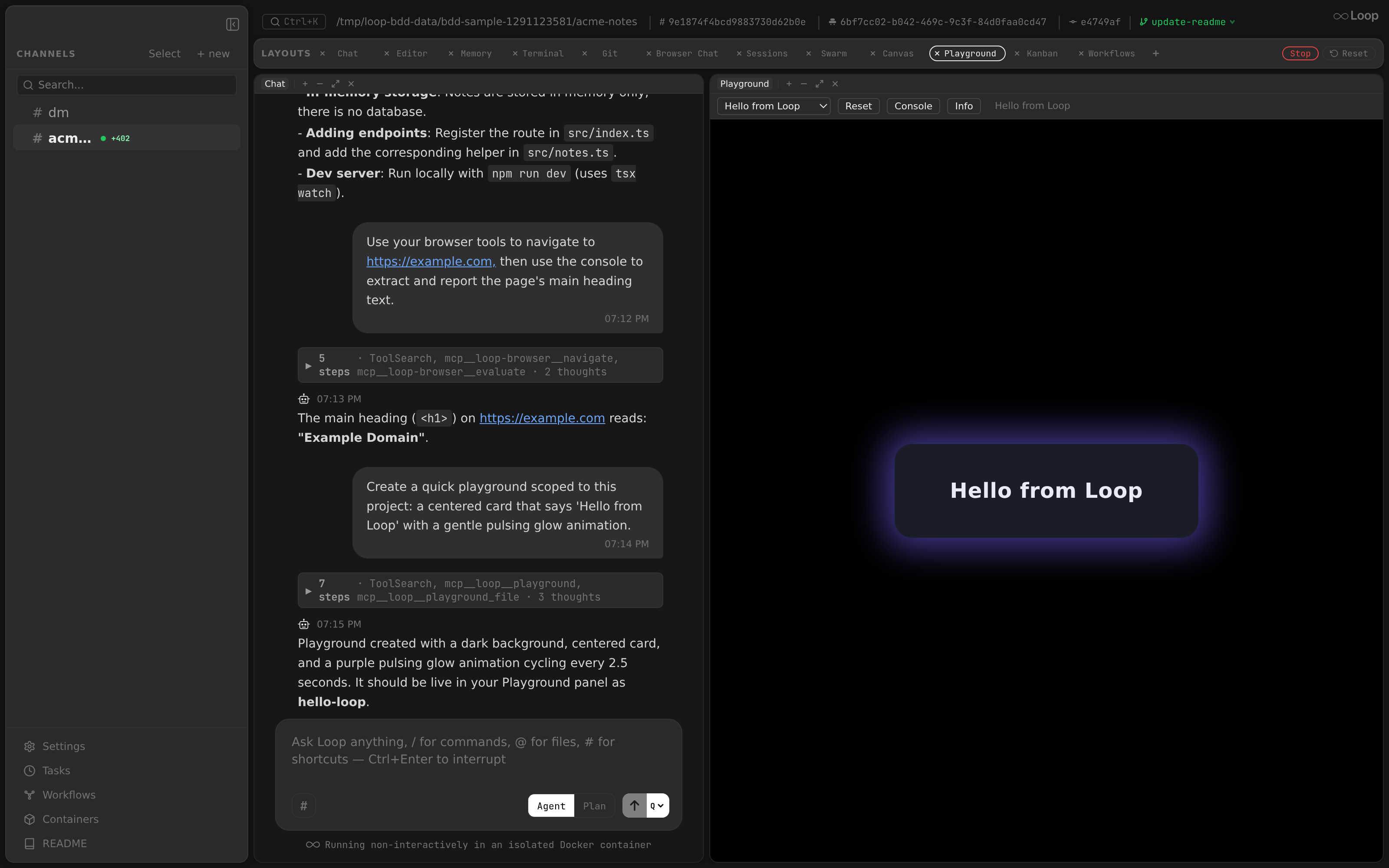
Component: app/src/components/panels/PlaygroundPanel.tsx
The playground renders agent-generated code in a sandboxed <iframe> with sandbox="allow-scripts". This provides process isolation — the playground code cannot access the parent page or the Loop API.
Toolbar
| Control | Action |
|---|---|
| Selector | Dropdown to switch between named playgrounds (shown when 2+ exist) |
| Reset | Clear errors and console, reload the iframe with current code |
| Console | Toggle the console output panel (bottom) |
| Export | Download the playground as a standalone HTML file |
| Share | Expose the playground publicly over the internet (see Public sharing ); shows the public URL (click to open in your external browser, Copy button to copy). Toggles to Unshare. |
The toolbar also shows the last update description from the agent.
Console Capture
A console bridge script is injected into the iframe HTML. It intercepts console.log, console.warn, console.error, console.info, and console.debug calls and forwards them to the parent via postMessage. The parent displays them in a collapsible bottom panel with timestamps and color-coded severity.
State
The same script gives the page window.loop.state, a JSON object the daemon keeps per playground, so a page can save what the user did and an agent or a script can read or change it:
const state = await window.loop.state.get();           // the whole state
await window.loop.state.set({ score: 12, draft: null }); // merge; null removes a key
const stop = window.loop.state.subscribe(s => render(s)); // on every change
get and set resolve with the whole state. subscribe fires on changes from any panel showing the playground and from PATCH /api/playground/state; it returns a function that stops it. A state update doesn’t reload the page.
The state is stored as state.json in the playground’s dir (at most 1 MiB), so agents working on the playground can read it, and it is served with the playground’s other files, publicly too when the playground is shared. Don’t keep secrets in it. window.loop.state needs the Playground panel; on a shared page, its calls fail after 10 seconds.
Infinite Loop Protection
Before injecting JavaScript into the iframe, loops (for, while, do) are instrumented with a timing guard. If a loop body runs for more than 3 seconds, it throws an error.
ES Modules & Import Maps
JavaScript runs as <script type="module">, enabling:
- CDN imports —
import confetti from 'https://esm.sh/canvas-confetti' - Framework imports —
import { createApp } from 'https://esm.sh/vue' - Top-level await —
const data = await fetch('...').then(r => r.json())
Import Maps
Agents can provide an import_map field with a JSON import map. This enables clean bare module imports:
{
  "imports": {
    "react": "https://esm.sh/react@18",
    "react-dom/client": "https://esm.sh/react-dom@18/client",
    "three": "https://esm.sh/three"
  }
}
With this import map, the agent can write:
import React from 'react';
import * as THREE from 'three';
The import map is injected as <script type="importmap"> before the module script. See esm.sh docs
for CDN URL format.
MCP Tool
update_playground
Pushes HTML/CSS/JS to a named playground. See MCP Server for full tool reference.
Parameters:
  name (string, required): Playground name (e.g. 'snake-game', 'dashboard')
  title (string, required): Display title (saved in README.md frontmatter)
  description (string, required): What it does, how to use it, controls (saved as README.md body, markdown)
  html (string): HTML body content (no <html>/<head>/<body> tags)
  css (string): CSS styles
  js (string): JavaScript ES module code
  import_map (string): JSON import map for bare module specifiers
At least html or js is required. The title and description are composed into a README.md with YAML frontmatter.
File Storage
Playgrounds are stored in two locations depending on scope:
Global (~/.loop/playground/):
~/.loop/playground/
  snake-game/
    index.html       # HTML body content
    style.css        # CSS styles
    script.js        # JavaScript code
    importmap.json   # Import map (optional)
    README.md        # Description (optional)
Project (.loop/playground/ in the channel’s working directory):
/path/to/project/.loop/playground/
  my-viz/
    index.html
    style.css
    script.js
    ...
The global playground directory is bind-mounted into agent containers, so agents can also read/write playground files directly. Project-scoped playgrounds live within the project directory and are accessible via the channel’s mount.
Since agents can write there, Loop opens each playground’s files within that playground’s directory: a symlink inside it is followed only while it stays in the playground, so a link to a host file or to another playground is refused rather than served, written or deleted. A playground that is itself a link to another one in the same base still works. A project’s .loop/playground must be a real directory, not a symlink.
API Endpoints
| Method | Endpoint | Description |
|---|---|---|
PUT | /api/playground?name=... | Store code + broadcast update |
GET | /api/playground?name=... | Retrieve current code |
GET | /api/playground/state?name=... | The playground’s state ({} without one) |
PATCH | /api/playground/state?name=... | Merge a JSON object into the state (null removes a key); tells the panels |
GET | /api/playground/export?name=... | Download as standalone HTML |
GET | /api/playground/items | List all playground names (global + project) |
GET | /api/playground/serve/{name} | Serve global playground as HTML page |
GET | /api/playground/serve-project/{channel_id}/{name}/ | Serve project-scoped playground as HTML page |
PUT | /api/playground/share?name=... | Share publicly; returns {url, token} (idempotent per playground; requires playground_share.enabled) |
DELETE | /api/playground/share?name=... | Stop sharing |
GET | /api/playground/share?name=... | Share status for one playground → {shared, url} |
GET | /api/playground/share | List all active public shares |
All endpoints accept optional scope=project&channel_id=... query parameters to target project-scoped playgrounds. Without these parameters, operations default to the global scope.
See API Reference for full request/response schemas.
Public sharing
A playground can be exposed over the internet while still being served from the local machine, via a cloudflared
quick tunnel. Disabled by default — set playground_share.enabled: true (see configuration
).
How it works
- Clicking Share (panel toolbar) or calling the
playground_shareMCP tool registers an opaque 32-hex token for the playground and returns a public URL:https://<random>.trycloudflare.com/p/<token>. - The tunnel points at a dedicated, playground-only HTTP listener — not the main API (
:8222). Only/p/{token}routes are reachable publicly, so no other endpoint is exposed. The public surface is served withCache-Control: no-store. - The
cloudflaredbinary is downloaded lazily to~/.loop/binon first share and verified against a pinned sha256 (fail-closed). Quick tunnels are anonymous — no Cloudflare account or token. - Multiple playgrounds share in parallel over a single tunnel, isolated by token. The tunnel + listener start on the first share and stop when the last one is removed (reference-counted).
- Idempotent per playground. A share’s identity is the playground’s resolved directory, so sharing the same playground again — from another channel, thread, or panel that maps to the same dir — returns the same token rather than opening a second tunnel. A global playground resolves to one dir regardless of channel; a project playground resolves to the project root (so sharing it from any thread or worktree of the project collapses to one share).
- Unshare (or the global Playground Shares panel, or the MCP tool with
action: unshare) revokes the token immediately — the URL then returns404. Because identity is the dir, any channel/thread mapping to the same playground can unshare it.
Playground Shares panel
The sidebar Playground Shares button opens a panel listing every active public share across the daemon, with its URL (click to open in your external browser, Copy button to copy) and a Disable button per row. It live-updates as shares are added or removed. The sidebar button also shows a red count badge of how many playgrounds are currently public, so open tunnels are always visible at a glance.
The per-playground Share toolbar reflects live state too: it hydrates from the daemon (resolved by dir), so returning to a still-shared playground — even one shared from a different thread of the same project — shows Unshare and its URL rather than a stale Share.
Security notes
- A shared playground is public to anyone with the link — there is no authentication on
/p/{token}. Tokens are long and opaque (unguessable), but treat the URL as a secret. - Revocation is immediate; the tunnel carries only playground content, never the rest of the API.
Security
- The iframe uses
sandbox="allow-scripts allow-same-origin allow-forms". Playground code runs in a sandboxed context. - When the mouse enters the playground iframe, the parent page blurs any focused element (e.g. the chat textarea) and focuses the iframe, so keyboard events reach the playground content (important for interactive games).
- Playground names are validated against
^[a-zA-Z0-9][a-zA-Z0-9_-]{0,63}$to prevent path traversal.